STL Viewer
A free online STL viewer that opens STL, 3MF, OBJ and GLB files right in your browser. Turn the model, switch to wireframe, and check the size in millimetres, the triangle count and whether it's watertight before you slice.
Runs in your browser. Your file is never uploaded.
Or try a sample:
Read on your device. Nothing is uploaded.
What the STL viewer shows you
Everything you would check before sending a file to the printer, on one screen.
Size in millimetres
Width, depth and height of the box around the model. STL and OBJ files carry no unit, so the viewer reads them as millimetres, the way slicers do. If the model was drawn in inches or centimetres, pick that unit and the numbers change. 3MF files state their own unit, and GLB files are in metres.
Triangle count
How many triangles make up the surface. A very high count makes files large and slicing slow; a very low one shows flat facets on curved surfaces. The wireframe view shows where the triangles are.
Watertight check
Whether every edge is shared by exactly two triangles, so the model closes around a volume. Holes and bad edges are counted. A model that isn't watertight can slice with gaps or missing walls; the STL repair tool fixes the common cases.
Volume and pieces
The volume of a watertight model in cubic centimetres, a quick guide to how much material it needs, and how many separate pieces the file holds. A stray piece floating next to the model shows up here.
How to view an STL file online
- 01
Open the file
Drop an STL, 3MF, OBJ or GLB file on the viewer, or tap to choose one. It opens on your device and is not uploaded.
- 02
Look it over
Turn and zoom the model, switch to wireframe, and read the size, triangle count and watertight check.
- 03
Fix or print
If the check finds holes, repair the file first. If the size looks wrong, choose the right unit. Then open it in your slicer as usual.
Try the STL viewer with a sample
No file at hand? Open one of ours. Each was made with Hooray3D.
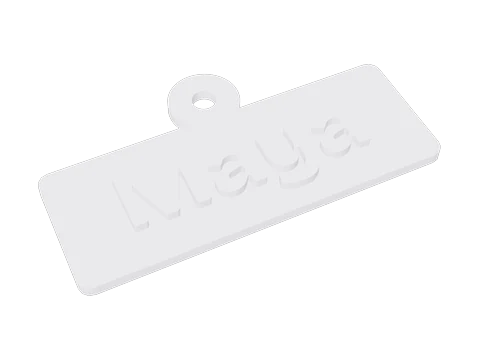 Name keychainSTL · 1,482 triangles
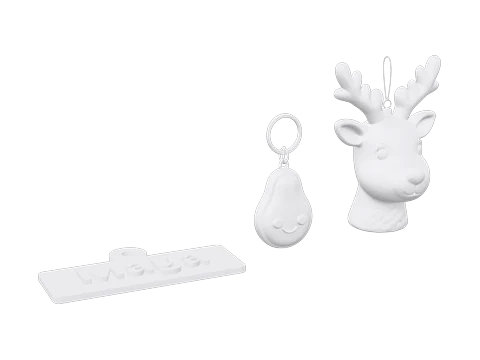 Gift plate3MF · 3 objects · 40,278 triangles
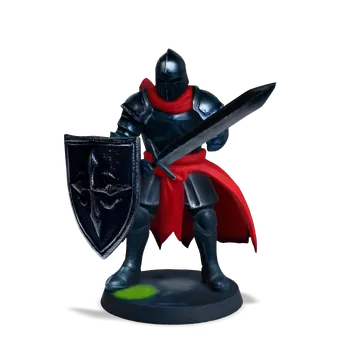 KnightGLB · 18,686 triangles
Clay, wireframe and turning the model
Clay view
A plain grey surface under soft light shows the shape without colours or textures, close to how it comes off the printer. Flat facets show where the mesh is coarse.
Wireframe view
Every triangle edge drawn as a line. Dense areas show where the detail is, and long thin triangles often mark places that were patched or simplified.
Turn and zoom
Drag to rotate and scroll to zoom on a computer. On a phone or tablet, turn the model with one finger and pinch to zoom. The model stays centred while you look around it.
Files it opens
STL in binary or ASCII form, 3MF projects from PrusaSlicer, Bambu Studio and other slicers, OBJ, and GLB or glTF files with the data inside. Files with several objects open together, placed as in the file.
What to check before you print
Is it the size you expect?
Compare the size with what you meant to print, and with your printer: desktop printers mostly have beds between 180 and 256 mm across. A size off by 25.4 or by 1,000 is a unit mix-up, not a broken file.
Does it have a flat side to stand on?
Turn the model and look along the bottom. A flat base sticks to the bed and needs no supports under it. Your slicer can lay the model on any face, so the side it was saved on doesn’t matter.
Is it one closed piece?
The watertight check and the piece count tell you. Parts that float free of the main body need supports, or they print in mid-air and fail.
Are the details big enough?
Switch to wireframe and zoom into small features. Text, spikes and walls thinner than your nozzle, often 0.4 mm, won’t come out. Print larger, or thicken them in a modelling program.
What the viewer doesn't do
Files up to 50 MB
Larger files may open slowly or not at all, especially on phones with little memory. Most single models are well under that size.
Shape only
Colours, textures and materials are not shown. A multi-colour 3MF opens as plain grey parts.
No changes to the file
The viewer only reads. To close holes use STL repair; to turn a 3MF into STL use 3MF to STL.
Overall size, not point to point
The size is the box around the whole model. It doesn't measure between two points you pick.
STL viewer questions
Is this STL viewer free?
Yes. Opening and checking files is free, with no account, no limit on how many files you open and no watermark.
Are my files uploaded?
No. Your browser reads the file, and the file stays on your computer or phone.
Do I need to install anything?
No. The viewer runs in current versions of Chrome, Edge, Firefox and Safari, on Windows, macOS, Linux, Android and iOS. There's no app or plug-in.
What file types can it open?
STL (binary or ASCII), 3MF, OBJ, and GLB or glTF with the data inside. A .gltf that points to separate .bin or texture files can't be opened by itself; export it as a single .glb first.
Why does my model look tiny or huge?
STL has no unit. A model drawn in inches but read as millimetres comes out 25.4 times too small, and one saved in metres comes out 1,000 times too small. Pick the unit the model was made in and the size updates.
What does watertight mean?
Every edge of the surface is shared by exactly two triangles facing the same way, so the model has a clear inside and outside. Slicers need that to work out walls and infill.
Can I open STL files on my phone?
Yes. Open this page in your phone's browser, tap to choose a file from Files or Downloads, then turn the model with one finger and pinch to zoom. Big files are slower on older phones.
Can I measure parts of the model?
The viewer shows the overall width, depth and height in the unit you choose. It doesn't measure distances between points yet.
Why do some parts of my model look see-through?
Those triangles face inwards. The viewer draws each triangle from the front only, so faces turned the wrong way look like holes. The STL repair tool turns them the right way.
Can I open files from Printables or Thingiverse?
Yes. Downloaded STL and 3MF files open directly. If the download is a zip archive, unzip it first and open the model inside.
No model yet? Make one from a photo.
Upload a photo and get a 3D model you can print. Free to try, no sign-up.
More print tools
Changelog
Version 1.0 · Updated Oct 9, 2026
- 1.0 · First version. Opens STL, 3MF, OBJ and GLB files; shows the size in mm with a unit choice, the triangle count, a watertight check and the volume; clay and wireframe views.