Lithophane Maker
A free lithophane maker that turns a photo into a printable STL right in your browser. See it lit from behind before you print, then set the size, thickness and frame and download.
Runs in your browser. Your file is never uploaded.
Or try a sample:
Read on your device. Nothing is uploaded.
How a lithophane works
Thick where it's dark
A lithophane is a thin plate that shows a picture when light shines through it. Dark parts of the photo are printed thick and let little light through; light parts are thin and glow.
See it lit before you print
The preview shows the plate as it looks with a light behind it, worked out from the thickness at every point. It is a guide: the real result depends on your filament and your light.
The right way round
The textured side faces you, and from that side the picture reads the right way round. From the flat side it is mirrored, so stand or hang it with the texture towards the room.
One closed plate
The plate and its frame are one closed mesh with a flat back, so it lies flat or stands upright in your slicer without repairs.
How to make a lithophane
- 01
Choose a photo
JPG, PNG or WebP up to 20 MB. It opens in your browser and is not uploaded.
- 02
Check it lit from behind
Adjust the size, thickness and frame and watch the backlit preview. Switch to 3D to see the texture.
- 03
Download and print
Download the STL and print it upright with solid infill in white PLA.
Try the lithophane maker with a sample
A golden retriever portrait and a porcelain figurine: both have the plain, light background lithophanes like.
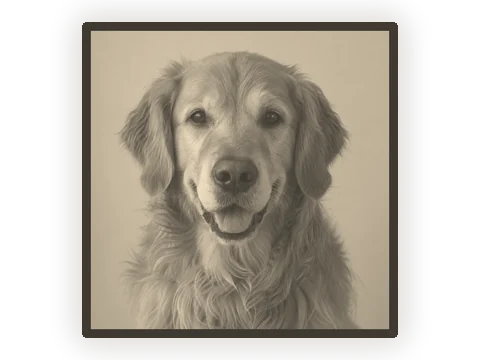 Golden retrieverJPG
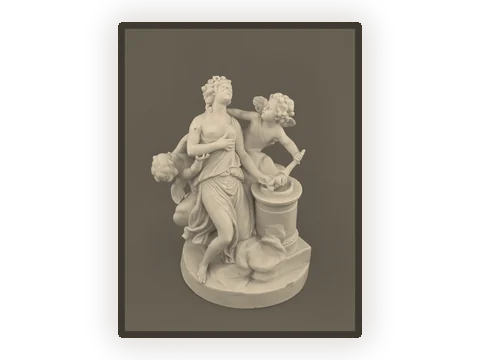 Porcelain figurineJPG
Choosing size, thickness and frame
Size
Set the width in millimetres and the height follows the photo. The photo is sampled every 0.2 mm, about the width of one nozzle line. Past about 140 × 140 mm, or the same area in another shape, it is sampled a little more coarsely so the STL stays under 50 MB.
Thickness
The thinnest part, where the photo is white, starts at 0.8 mm; the thickest, where it is black, at 3 mm. A wider range gives more contrast but needs a brighter light.
Frame
A frame at full thickness stiffens the plate and gives it a clean edge. It is 3 mm wide unless you change it, and 0 leaves it off.
File size
Fine detail makes big files: a 100 mm plate from a landscape 4:3 photo has about 435,000 triangles, an STL of about 21 MB. A portrait photo is taller at the same width, so its file is bigger. No plate passes a million triangles.
Getting a good picture
Crop tight
Crop to the part that matters before you open the photo. A face should fill most of the plate; small faces lose their features at 0.2 mm a point.
More contrast than looks right
A plate squeezes the tones of a photo into a few millimetres. A picture that looks a little too contrasty on screen often prints just right.
A plain, light background
A light background prints thin and glows, which frames the subject. A busy one competes with it.
Colour doesn’t matter
Only brightness turns into thickness. Looking at the photo in black and white first shows you what the plate will show.
Printing your lithophane
Settings most people use. Your printer and filament may want small changes.
Stand it up
Printing the plate upright lets each layer trace the picture's detail. A brim helps a tall, thin plate stay put.
Solid, light-coloured filament
Use 100% infill so the light falls evenly, and white or natural PLA so as much light as possible gets through. Dark colours hide the picture.
Fine layers
Layers of 0.1 to 0.12 mm bring out soft tones. A standard 0.4 mm nozzle is fine.
The light behind it
A warm LED, a window or a small lamp box all work. Keep the light a few centimetres behind the plate so it spreads evenly.
What it doesn't do yet
Flat plates only
Curved panels and cylinder lampshades are planned for a later version.
One colour
Colour lithophanes, which stack filament colours, aren't supported. Print in white or natural filament.
Photos up to 20 MB
Bigger photos don’t help: a 150 mm plate uses at most about 750 points across, far fewer than a phone photo has.
A preview, not a promise
The backlit preview estimates how light passes through white PLA. Your filament, layer height and light change the result, so print a small test first.
Lithophane maker questions
Is this lithophane maker free?
Yes. Making and downloading lithophanes is free, with no account and no watermark.
Is my photo uploaded?
No. The photo is read in your browser and the STL is made there. It never leaves your device.
What photos make good lithophanes?
Photos with clear contrast and a subject that fills the frame. Faces, pets and buildings work well; very dark or very busy pictures turn muddy.
Is the picture mirrored?
No. Looking at the textured side, the picture reads the right way round. Put the light on the flat side and look at the textured side.
What thickness should I use?
0.8 mm at the thinnest and 3 mm at the thickest is a common starting point for white PLA. If the dark parts look washed out, raise the maximum; if the bright parts glow too little, lower the minimum, but not much below 0.6 mm.
How should I print it?
Most people print lithophanes standing upright, with 100% infill, fine layers and white PLA, and add a brim when the plate is tall.
Can I make a curved or cylinder lithophane?
Not yet: flat plates only for now. Curved lampshades are planned.
Why is the STL so large?
A lithophane needs fine detail, so the photo is sampled every 0.2 mm and each point becomes two triangles. A 100 mm plate from a landscape photo is about 21 MB, and no plate passes 50 MB.
Does it work on a phone?
Yes. Choose a photo from your library and the maker runs on the phone itself. Large plates take a few seconds longer.
Can I use a PNG with a transparent background?
Yes. Transparent parts are treated as white, so they print thin and glow.
How big should a lithophane be?
For a desk lamp or a window, 80 to 150 mm wide is common. Below about 60 mm, faces lose detail; much larger plates take many hours to print.
Want a 3D model of the photo instead?
Upload the same photo and get a full 3D model you can print. Free to try, no sign-up.
More print tools
Changelog
Version 1.0 · Updated Oct 9, 2026
- 1.0 · First version. Flat lithophanes from JPG, PNG and WebP photos, with the size in mm, thickness, a frame, a backlit and a 3D preview, and an STL download.