GLB to STL Converter
Convert GLB to STL and get a file that's ready to slice. Set the height in millimetres, add a base if you want one, and download a solid STL. It works with glTF files too, right in your browser.
Runs in your browser. Your file is never uploaded.
Or try a sample:
Read on your device. Nothing is uploaded.
What the converter does with your GLB
Stands the model up
glTF files point Y up; printers point Z up. The model is turned so it stands on the bed the way it stands in the preview, and centred on the plate.
Sizes it in millimetres
GLB is measured in metres, and AI models often arrive at an arbitrary scale. Set the height you want, and the width and depth keep their proportions.
Makes it one solid
Texture seams split a mesh into pieces that look joined but aren't. The converter joins them and checks that the result is a closed solid a slicer can fill.
Clears specks, flags floating parts
Specks smaller than 1 mm³ at print size are removed. Parts that float above the bed, like eyes or a loose accessory, are counted so you know to add supports.
How to convert GLB to STL
- 01
Drop a GLB or glTF
Choose a file up to 50 MB. It opens in your browser and is not uploaded.
- 02
Set the size
Type the height in millimetres and choose whether to add a base. The final width, depth and height update as you type.
- 03
Download the STL
Get a binary STL in millimetres, ready for PrusaSlicer, Bambu Studio, Cura or OrcaSlicer.
Try GLB to STL with a sample
AI models from our examples, each made with Hooray3D from a single photo. Open one to try the converter without a file of your own.
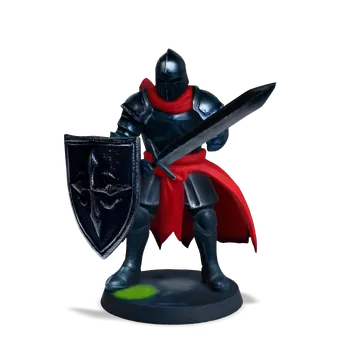 KnightGLB · 18,686 triangles · 60 mm tall
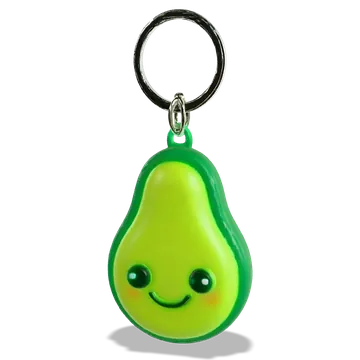 Avocado keychainGLB · 19,066 triangles · 45 mm tall
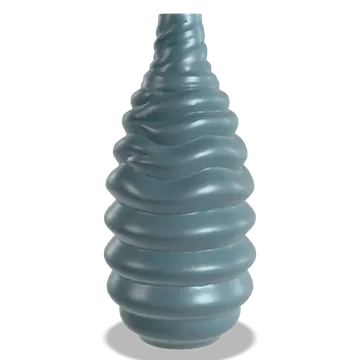 Spiral vaseGLB · 19,604 triangles · 150 mm tall
Bases, colours and what gets lost
An optional base
A 2 mm base that reaches 3 mm past the model’s footprint gives small figures a flat, stable foot. The model sinks 0.4 mm into it, so the two print as one piece.
Colours and textures
STL holds shape only. Colours baked into a GLB's textures are dropped: paint the print, or split the model into parts in your slicer for a multi-colour print.
Animation and rigs
Animations and skeletons are ignored, and the model is exported in its rest pose.
glTF with separate files
A .gltf that comes with a .bin file and texture images can't be read by itself. Export it again as a single .glb, for example in Blender with the glTF Binary format.
Choosing a print size
Figures and busts
Around 80 to 120 mm tall gives a figure room for a face and hands on a filament printer. Resin printers hold detail at smaller sizes.
Keychains and charms
Around 30 to 50 mm, without a base. Add the ring hole in your modelling program, or make a flat keychain with our image to STL relief maker, which adds one for you.
Check your printer’s bed
The final width, depth and height are shown before you download. Desktop printers mostly have beds between 180 and 256 mm across.
Thin parts shrink too
Scaling changes every wall with the model. A 0.8 mm wall at 100 mm tall becomes 0.4 mm at 50 mm, the width of a common nozzle and the edge of what prints.
Limits of the converter
Compressed GLB files
Files that use Draco or meshopt compression can't be read yet. Open them in Blender and export them again without compression.
Files up to 50 MB
Larger files may be slow or fail on phones. Most single models are far smaller.
Very thin parts
Hair strands, sword tips and other thin parts may be too thin to print at small sizes. Check them in your slicer's preview, or print larger.
Open surfaces
Some models are made of single-sided surfaces, like a cape or a leaf, and can't be closed into a solid. The converter tells you when that happens; the STL repair tool may help with small gaps.
GLB to STL questions
Is the GLB to STL converter free?
Yes. Converting and downloading are free, with no account and no watermark.
Are my files uploaded?
No. Your browser reads the GLB and writes the STL. The file stays on your device.
What's the difference between GLB and glTF?
They're the same format. A .glb packs the model, its data and its textures into one binary file; a .gltf is text that keeps its data inside or in separate files. This converter reads .glb files, and .gltf files with the data inside.
What size will my STL be?
The height you set, in millimetres, with the width and depth in proportion. With a base, the print is 1.6 mm taller: the base is 2 mm thick and the model sits 0.4 mm into it.
Will the colours come through?
No. STL has no colour. For a colour print, paint the model or split it into parts in your slicer.
How do I convert GLB to STL in Blender?
File › Import › glTF 2.0, then File › Export › STL. Blender works in metres, so a model exported at scale 1 can open in your slicer 1,000 times too small; set the export scale to 1000, or scale it up in the slicer.
Can I convert GLB to 3MF or STEP?
Not here. STEP describes exact CAD surfaces that a triangle mesh doesn't have. For a 3MF, open the STL in your slicer and save the project.
Why does it say my model isn't solid?
The mesh has openings that can't be closed safely, often single-sided surfaces. The STL still downloads; check it in your slicer's preview, or fix the model in a modelling program.
Do I need to repair the STL after converting?
Usually not. The converter joins the seams and checks that the result is solid. If it reports open surfaces, run the file through STL repair, which closes small holes and says what it can’t fix.
Where do GLB files come from?
AI 3D generators, Blender, game engines and model libraries all use GLB, because it packs a whole model into one file. Hooray3D gives you a GLB along with the STL.
Does it work on a phone?
Yes. Choose a GLB from Files or Downloads and the converter runs on the phone itself. Large models take longer there, and very large files can run out of memory on older phones.
Want a GLB to start with?
Upload a photo and get a 3D model as a GLB and a print-ready STL. Free to try, no sign-up.
More print tools
Changelog
Version 1.0 · Updated Oct 9, 2026
- 1.0 · First version. Converts GLB and glTF (with the data inside) to STL, with the height in mm, an optional base, a solid check and removal of loose specks.