3D Print from Photo
Go from a photo to a 3D print in an afternoon. Upload a picture of a pet, a toy, a figurine or a drawing, and our AI builds a watertight 3D model sized in millimetres for your slicer. It is the shortest way to 3D print from photo to finished part, with no modelling skills needed.
Your photo is deleted after 7 days and never used to train AI.
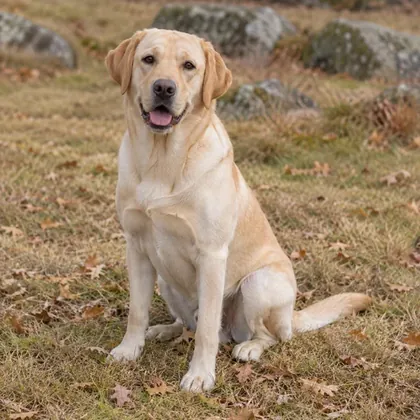
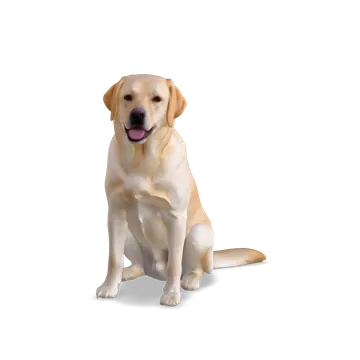
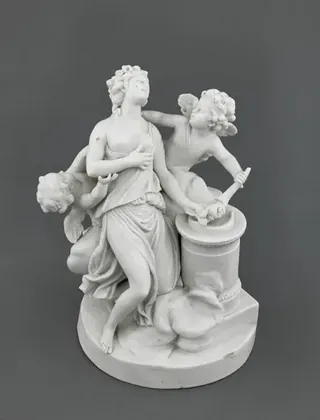
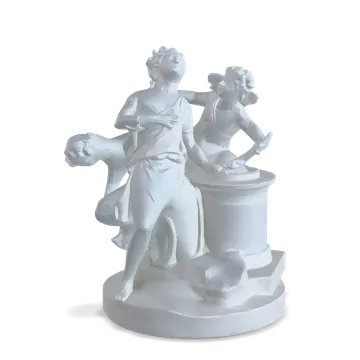
3D print from photo in three steps
- 01
Upload a photo
One subject, a plain background and even light. Pets, toys, figurines, busts, products and children’s drawings all work. Your photo is checked first, then the AI starts.
- 02
Check the 3D model
Within a minute or so you get a 3D preview. Turn it around and look underneath. If it isn’t right, try another photo or the other quality.
- 03
Size it and download the STL
Set the height in millimetres, add a 2 mm base if it should stand, and download a watertight STL for your slicer with a Credit Pack or a plan.
3D print from photo examples
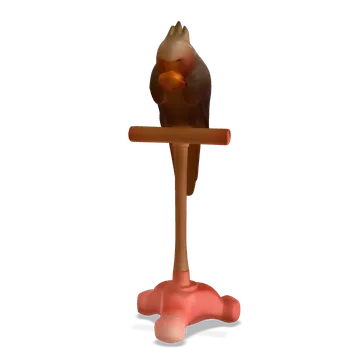
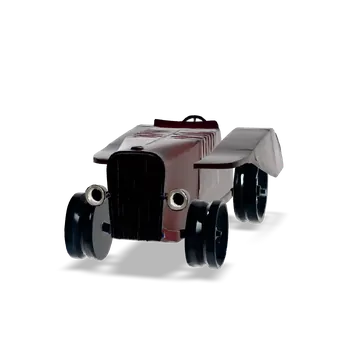
Every one of these was made from a single photo with Standard quality, then sliced in PrusaSlicer at 0.2 mm layers without errors.
What prints well from a photo
The AI copes best with solid things that have a clear outline.
Pets
A dog or cat photographed from the side or a three-quarter angle, standing or sitting, makes a figure that stands up on its own. Fur becomes sculpted texture.
Figurines and toys
Objects that already are small sculptures, like porcelain figures, action figures and plush toys, come out closest to the original.
Children’s drawings
A crayon dragon or rocket becomes a chunky character you can hand back to the artist. Bold, simple drawings work best. For a flat plaque of the drawing instead, use Image to STL.
People
For a person, use Photo to figurine: it first draws a stylised figurine from the photo, then builds the 3D model. You need the person’s permission.
Which quality to use for a print
The workspace offers four qualities. Two of them give you an STL to print today.
Quick: a first look
Free and fast, made with SAM 3D. It shows whether a photo works, but it downloads as GLB or OBJ only, so it is not the one to print.
Standard: the one to print
Rodin Gen-2.5 Fast, 2 credits or free once a day. Clean, watertight geometry with colour, and an STL sized in millimetres. Every example on this page is Standard.
Detailed: finest surface, no STL yet
TRELLIS 2 at 6 credits gives the finest surface, but its meshes are not ready for printing yet, so it downloads as GLB and OBJ.
High detail: for painted minis
Rodin Gen-2.5 at 150,000 faces, 8 credits, on Pro and Team plans. Worth it for figures you will prime and paint, where small details show.
Slicer settings from our tests
We sliced all 27 examples in PrusaSlicer before publishing them. These settings worked for every photo we used.
0.2 mm layers
Fine enough for faces and fur at 80 to 100 mm tall, and twice as fast as 0.1 mm. An 80 mm model is about 400 layers.
Organic supports
Chins, tails and outstretched legs overhang. Organic (tree) supports held every photo example and came off cleanly; 26 of the 27 examples needed some.
A 2 mm base
The base gives small figures a flat footprint, so they stand up and stick to the bed. Add it before you download; the model sinks into it slightly so the two fuse.
Filament
The 80 mm Labrador took 25 g of PLA and the 100 mm parrot 12 g. Filament grows with the cube of the height, so a model twice as tall uses about eight times as much.
What a photo can’t tell the AI
The back is a guess
One photo shows one side. The AI fills in what it cannot see, so markings on the back will not appear.
Very thin parts
Whiskers, antennae and thin straps may come out thick or missing. Most of them would be too fragile to print anyway.
Glass and shiny things
See-through and mirror-like objects confuse every image to 3D model tool. Photograph them against a plain, darker background.
One colour per STL
The preview is in colour, but an STL holds shape only. Paint the print, or change filament at a set height for a second colour.
3D print from photo FAQ
Can I 3D print a photo for free?
You can make 2 free previews a day, one of them in Standard quality, and look at them in 3D. Downloading the STL needs a Credit Pack or a plan, from $9.90 a month.
What printer do I need?
Any FDM or resin printer that reads STL. The files open in PrusaSlicer, Bambu Studio, OrcaSlicer, Cura and Chitubox at the size you set.
Will the model print without repairs?
Standard models came out watertight in our tests, and all 27 examples on our site sliced in PrusaSlicer with no errors or warnings.
How big can I print it?
You set the height before you download: 30 mm for a miniature, 150 mm for a statue on a shelf, or anything in between. The model scales evenly, so the detail scales with it.
Can I print it in colour?
The STL is one colour. Paint the print, or swap filament at a set height for a two-colour print. Multi-colour 3MF is not available yet.
What photos work best?
A sharp photo of one subject on a plain background, in soft and even light, taken from the front or at a three-quarter angle, with nothing cut off at the edges.
Who owns the 3D print?
As between you and us, you own the models you download and may sell prints of them, as long as you have the rights to the photo you uploaded.
Is my photo kept?
Photos are deleted after 7 days and never used to train AI. Models made with credits are kept while your plan is active and for 30 days after it ends, or for 12 months if you only buy Credit Packs.
Can I make a flat sign or keychain instead?
Yes. Image to STL and PNG to STL turn a logo or drawing into a raised plate, keychain or cookie cutter, free and in your browser.
How many credits does a printable model use?
Standard uses 2 credits, a figurine from a photo 3, and High detail 8. Downloads never use credits, so you can export the same model as often as you like.