STL Editor
A free online STL editor for the changes you make before printing: resize in millimetres, rotate, move, cut a flat bottom and add a base. Every step can be undone, and a closed file stays closed.
Runs in your browser. Your file is never uploaded.
Or try a sample:
Read on your device. Nothing is uploaded.
What the STL editor does
The changes people make most often between downloading a model and slicing it.
Resize in millimetres
Type the width, depth or height you want. With the lock on, the other two follow so the model keeps its shape; with it off, you can stretch one side, for a thinner plaque or a taller vase.
Rotate
Turn the model a quarter turn at a time around X, Y or Z, or type any angle. It turns about its own centre and lands back on the bed, so it never drifts off the plate.
Cut a flat bottom
Slice away everything below a height you choose. Round bottoms, uneven scans and figures with tiny feet get a flat face that sticks to the bed without supports.
Add a base
A 2 mm base that reaches 3 mm past the model, with the model sunk 0.4 mm into it so the two print as one piece. Good for figures that would tip over.
How to edit an STL file online
- 01
Open the file
Drop an STL, OBJ or 3MF up to 50 MB. It opens in your browser; nothing is uploaded.
- 02
Make your changes
Resize, rotate, move, cut a flat bottom or add a base, and watch the model and its size update. Undo anything you don't like.
- 03
Download the STL
Download the edited model as a binary STL in millimetres and open it in your slicer.
Try the STL editor on a sample
Models made with Hooray3D. The avocado keychain has a round bottom: try Cut a flat bottom on it.
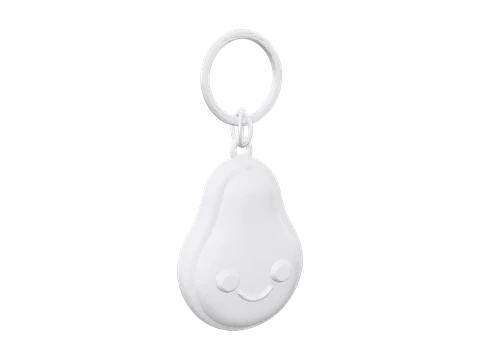 Avocado keychainSTL · 19,066 triangles
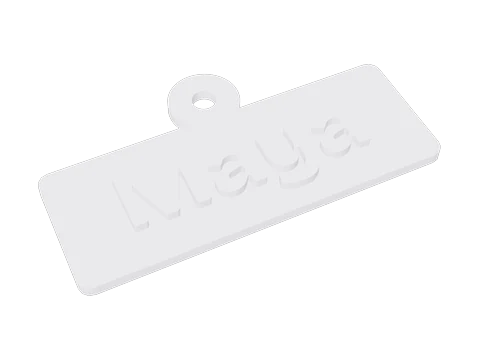 Name keychainSTL · 1,482 triangles
Undo, sizes and what you download
Undo and redo
Every change is a step you can take back, as many times as you like. Steps are applied to the file as you opened it, so undo returns exactly the earlier model, not an approximation.
Sizes you can trust
The size shown is the finished model, base included, in millimetres. STL files carry no unit, so they are read as millimetres, as slicers do; a 3MF uses the unit it states.
A closed STL
The cut and the base always give a closed solid: if your file was closed, the STL you download is too, and it slices without repairs.
Move and position
The model sits centred on the bed. Offsets in X and Y move it, and switching off Rest on the bed lets you lift it, for example to line it up with another part in your slicer.
When you need a full 3D editor
This editor covers the changes before printing. For the rest, a desktop program is the right tool.
Tinkercad
Free, in the browser and easy to learn. Good for adding text, joining shapes and cutting holes with simple blocks.
Blender
Free and very capable, for sculpting, remeshing and detailed fixes. It takes time to learn, and it works in metres unless you set it to millimetres.
Your slicer
PrusaSlicer, Bambu Studio and OrcaSlicer can scale, rotate and cut too, and Cura can scale and rotate. Use them when you only print the file yourself; edit here when you want a finished STL to share or keep.
Meshmixer
Autodesk's free mesh tool is no longer developed, but many people still use it for hollowing models and patching meshes.
What the editor doesn't do yet
Files that aren't closed
Files with holes or bad edges can be resized, rotated and moved, but not cut or given a base. Repair them first with STL repair.
One file at a time
Joining several files into one, and cutting along any plane, are planned for a later version.
No sculpting or text
The editor changes the model as a whole. Adding text, holes or detail needs a modelling program.
Files up to 50 MB
Larger files may be slow or fail on phones. Cutting and the base take a few seconds on a file with a million triangles.
STL editor questions
Is this STL editor free?
Yes. Editing and downloading are free, with no account and no watermark.
Are my files uploaded?
No. The editor runs in your browser, and the file stays on your device.
How do I resize an STL to an exact size?
Type the size you want in millimetres in the width, depth or height box. With the lock on, the model scales evenly, and the size shown is what your slicer will see.
How do I make a flat bottom on an STL?
Turn on Cut a flat bottom and set the height to cut at. Everything below it is removed, the cut face becomes the new bottom, and the model drops onto the bed.
Can I rotate an STL so it prints better?
Yes. Turn it a quarter turn at a time or by any angle. A model usually prints best with its largest flat side down and as few overhangs as possible.
Will the edited STL still be watertight?
If the file you opened was closed, yes: the cut and the base are made by a geometry library that only produces closed solids. A file with holes stays as it was, so repair it first.
Can I undo a change?
Yes. Undo and redo step through every change, and Start over returns the file as you opened it.
Does it work on a phone?
Yes. Open the file from Files or Downloads and the editor runs on the phone itself. Very large files are slower there.
What files can I open?
STL in binary or ASCII form, OBJ and 3MF. The objects in a 3MF are edited together as one model. For a GLB, use GLB to STL.
Can I add text or join two STL files?
Not here yet. Tinkercad and Blender can add text and join parts; joining files is planned for a later version of this editor.
Why is my STL tiny or huge in the slicer?
STL files carry no unit, so slicers read the numbers as millimetres. A model saved in metres opens 1,000 times too small, and one saved in inches 25.4 times too small. Type the size you want here in millimetres and download it.
Can I scale an STL by a percentage?
Yes. Work out the new size and type it in: 150% of a 40 mm model is 60 mm. With Keep proportions on, the other sides follow.
No model yet? Make one from a photo.
Upload a photo and get a 3D model you can print. Free to try, no sign-up.
More print tools
Changelog
Version 1.0 · Updated Oct 9, 2026
- 1.0 · First version. Resize in millimetres, rotate, move, cut a flat bottom and add a base, with undo and redo, for STL, OBJ and 3MF files up to 50 MB.